
Backup SMS4.04 - Google Play
You'll be able to see results in few seconds.
Publisher Description
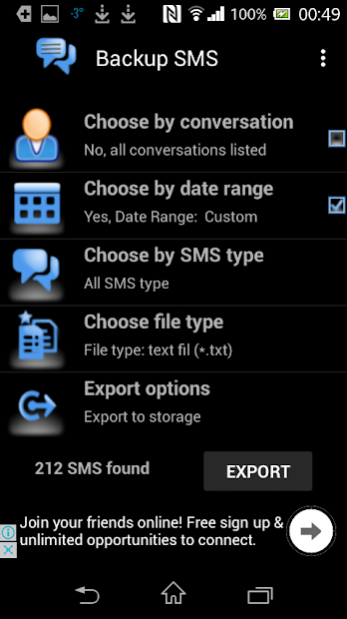
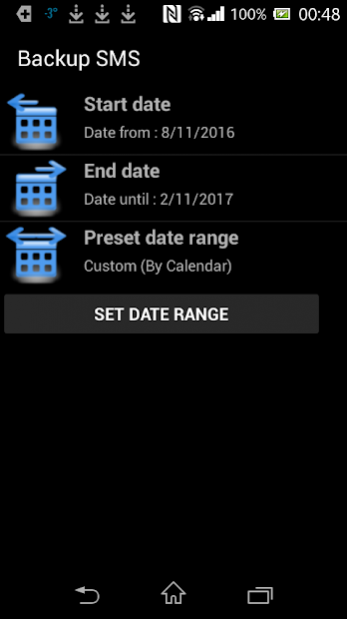
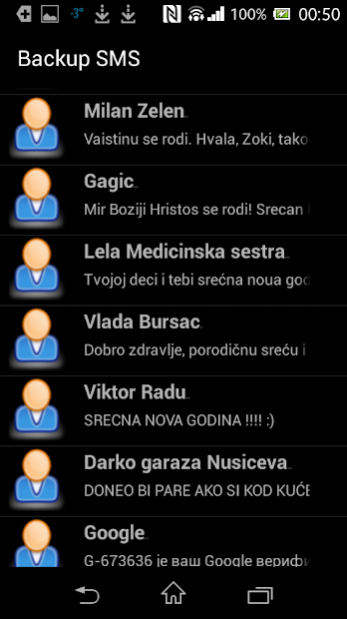
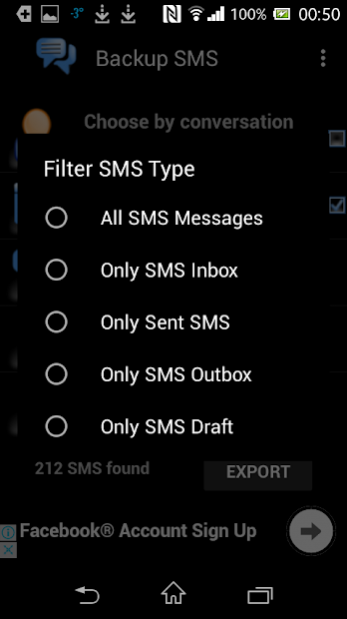
Backup SMS messages from your phone simply, in few clicks. SMS backup and restore to text or email is extremely important in cases of phone lost, steal or breakage. You can backup SMS messages partially by applying date range filter, or filter your backup SMS by particular contact. Further backup SMS filtering can be applied through selecting message backup folders: inbox, sent, outbox, draft, or all folders. You can export backup SMS messages to text file that can be saved or printed, or send correspondence of backup messages via E-mail as message content or attachment.
Needed permissions explanation:
SMS - READ YOUR TEXT MESSAGES (SMS OR MMS)/EDIT YOUR TEXT MESSAGES (SMS OR MMS)
These permissions are used to backup & restore your SMS messages
CONTACTS - READ YOUR CONTACTS/MODIFY YOUR CONTACTS
These permissions are used to establish relation between your contacts and messages
STORAGE - READ WRITE STORAGE
These permissions are used to backup & restore in your SD card and/or storage
Important Notice #1:
During SMS restore process you must accept TEMPORARY change of default SMS handling application and allow that app to be Backup SMS in order to successfully restore. Immediately after restore finishes, you will be offered to revert default app to your usual SMS application
Important Notice #2:
Do not try to export more than 1000 messages to text, CSV, or email. You should rather try to diminish exports through separating them by time range and correspondences. This restriction is caused by Android system activities data exchange limitation of 1 MB, not by our code. Please do not leave 1-star ratings based on unsuccessful large exports. Thank you for understanding.
About Backup SMS
The company that develops Backup SMS is Piandro. The latest version released by its developer is 4.04.
To install Backup SMS on your Android device, just click the green Continue To App button above to start the installation process. The app is listed on our website since 2020-05-01 and was downloaded 0 times. We have already checked if the download link is safe, however for your own protection we recommend that you scan the downloaded app with your antivirus. Your antivirus may detect the Backup SMS as malware as malware if the download link to com.piandro.backupsms is broken.
How to install Backup SMS on your Android device:
- Click on the Continue To App button on our website. This will redirect you to Google Play.
- Once the Backup SMS is shown in the Google Play listing of your Android device, you can start its download and installation. Tap on the Install button located below the search bar and to the right of the app icon.
- A pop-up window with the permissions required by Backup SMS will be shown. Click on Accept to continue the process.
- Backup SMS will be downloaded onto your device, displaying a progress. Once the download completes, the installation will start and you'll get a notification after the installation is finished.
Program Details
System requirements
Download information
Pricing
Version History
version 4.04
posted on 2020-05-01
- Optional multi language support added
- Contacts backup/restore opt in functionality added
- Call list backup/restore opt in functionality added
- Calendars backup/restore opt in functionality added
- Applications backup/restore opt in functionality added
- Pictures backup opt in functionality added
- EULA layout fixed
- Links update
- Minor UX update
- Minor bug fixes
version 4.03
posted on 2020-04-14
- Optional multi language support added
- Contacts backup/restore opt in functionality added
- Call list backup/restore opt in functionality added
- Calendars backup/restore opt in functionality added
- Applications backup/restore opt in functionality added
- Pictures backup opt in functionality added
- EULA layout fixed
- Links update
- Minor UX update
version 4.02
posted on 2020-04-10
- Optional multi language support added
- Contacts backup/restore opt in functionality added
- Call list backup/restore opt in functionality added
- Calendars backup/restore opt in functionality added
- Applications backup/restore opt in functionality added
- Pictures backup opt in functionality added
- EULA layout fixed
- Links update
version 4.01
posted on 2020-01-18
- Optional multi language support added
- Contacts backup/restore opt in functionality added
- Call list backup/restore opt in functionality added
- Calendars backup/restore opt in functionality added
- Applications backup/restore opt in functionality added
- Pictures backup opt in functionality added
- EULA layout fixed
version 4.00
posted on 2019-10-07
- Optional multi language support added
- Contacts backup/restore opt in functionality added
- Call list backup/restore opt in functionality added
- Calendars backup/restore opt in functionality added
- Applications backup/restore opt in functionality added
- Pictures backup opt in functionality added
- Internal performance controller added
Disclaimer
Official Google Play Link
We do not host Backup SMS on our servers. We did not scan it for viruses, adware, spyware or other type of malware. This app is hosted by Google and passed their terms and conditions to be listed there. We recommend caution when installing it.
The Google Play link for Backup SMS is provided to you by apps112.com without any warranties, representations or guarantees of any kind, so access it at your own risk.
If you have questions regarding this particular app contact the publisher directly. For questions about the functionalities of apps112.com contact us.
